
Google Docs
Citing in Google Docs.
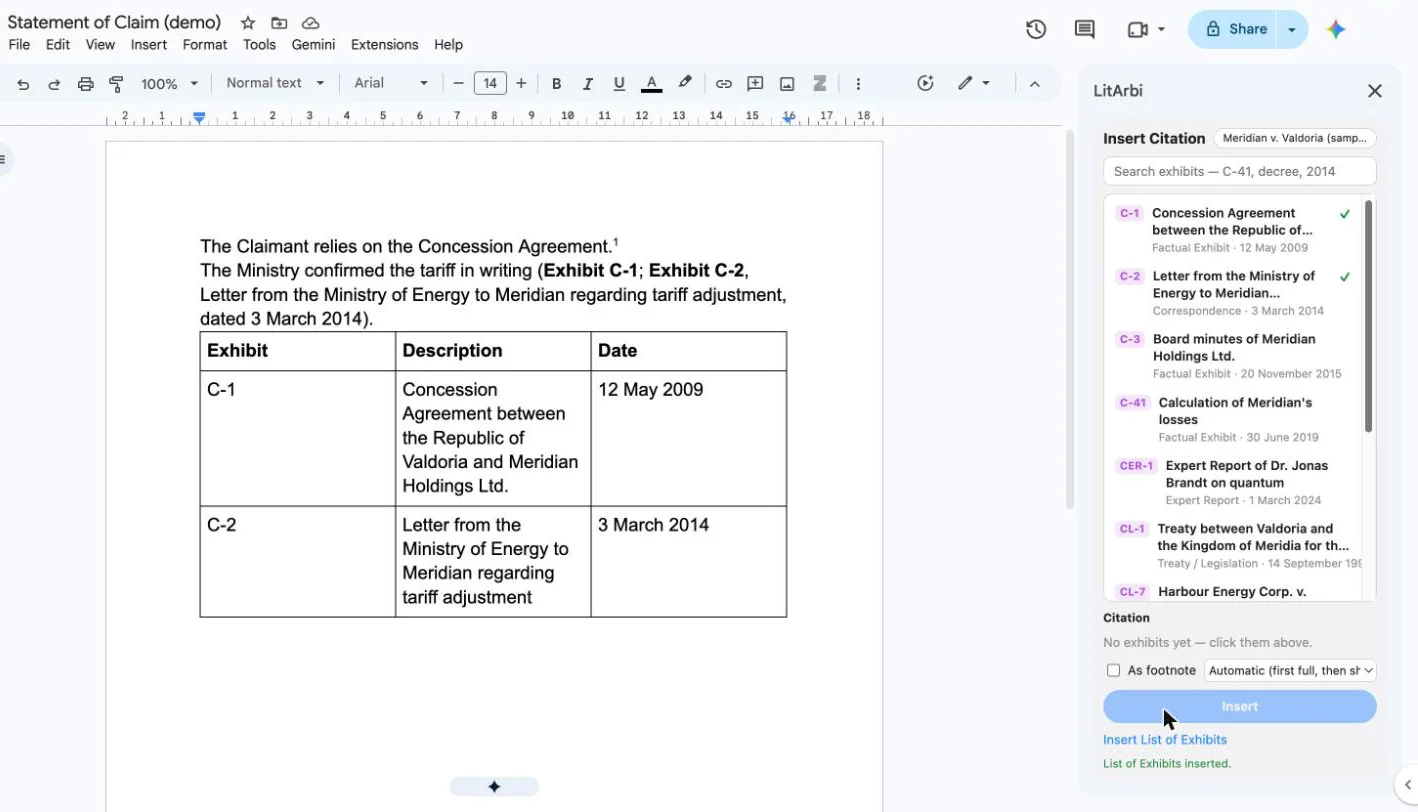
LitArbi’s Insert Citation pane in Google Docs, in the browser: the same citations as in Word — in the text or as footnotes, in full the first time and short after, each linked to its exhibit.
The add-ins

Google Workspace Marketplace and the Google Workspace Marketplace logo are trademarks of Google LLC.

- Insert Citation. Search the exhibits, click them into the citation, add pages or paragraphs, insert in the text or as a real Google Docs footnote — exhibit numbers in bold, the case names of awards in italics.
- First full, then short. Decided per document, from the citations it already holds.
- The List of Exhibits. A table of every exhibit the document cites, at the cursor; a second click updates it in place.
- Links that Travel. Every citation links to its exhibit; LitArbi for iPad opens it at the cited page.
- From your firm’s server. Exhibits from your firm’s LitArbi Server (version 1.8.1 or later) — Google passes the sign-in to your server, nothing goes to LitArbi — or from the exhibit list of a bundle made with LitArbi for Mac or Windows. Your documents stay in your Google account.
Be among the first counsel to use LitArbi.
Beta seats are limited. Reserve yours and we'll let you know the moment your invitation is ready.
You're on the list.
We'll email you the moment your beta invitation is ready.